ScreepsAiSLP Build Log · Part 1 of 8
ScreepsAiSLP Build Log – Part 1: An Old Starter Meets a New Server
By the end of the server build, I had a fast coding model running around the clock and an AI agent with its own locked-down Linux account. What it didn't have yet was a job.
The plan
This series is about turning that idle agent into a Screeps developer. The four-part server build covered the hardware, the GPUs and the agent's account. This one covers the less glamorous part: giving the agent a project, a way to check its own work, and a way to publish that work without embarrassing me.
The setup I landed on looks like this:
- One public GitHub repo, ScreepsAiSLP. I created it from screeps-typescript-starter, a community template that already has a build tool, a linter and a test runner wired up. The repo is public on purpose: it's a portfolio piece.
- The agent pushes, everything else pulls. The agent works on the AI server and pushes its commits to that one repo. My test server, my main private server and my computer just pull from GitHub.
- Three Screeps targets. A private test server on my main computer, a main private server, and eventually the official world. The official world is the persistent server, the one that never resets and where mistakes stay mistakes.
- Only I touch the official world. The agent never gets that login. When a version looks good on the test server, I mark it with a Git tag (a permanent name on one commit, like
v0.1-stable) and upload only tagged versions, by hand.
That last rule is the whole safety philosophy in one line. The agent is allowed to be wrong as often as it likes, right up until the point where being wrong costs me a colony.
Why TypeScript, and how an agent knows its code works
Screeps runs JavaScript. TypeScript is JavaScript plus type labels: you write down what kind of data each variable holds, and a compiler checks it before anything runs. For a human beginner, that's mostly a nice safety net. For an autonomous agent running on a local model, it's close to essential.
Local models make things up. Not maliciously, just confidently. Ask one for Screeps code and sooner or later it will call creep.harvestNearest() or some other function that sounds right and doesn't exist. The Screeps type definitions (a package called @types/screeps that describes every game object, method and constant) turn that from a runtime surprise into a compile error. The agent can run that check itself, in seconds, before every commit.
That raised the question I actually cared about: how does the agent get feedback at all? An agent that can't see results writes code that compiles and plays terribly. I settled on layers, from fast and safe to slow and realistic:
- Type check, lint and build. Seconds. Catches invented APIs, typos and style problems.
- Unit tests. Seconds. Small automated tests of single functions, like "does the spawn logic pick the right role?"
- Integration tests with screeps-server-mockup. A real Screeps game engine started inside a test, right on the AI server. The test builds a tiny world, loads the bot, runs ticks and checks what happened.
- The live test server's API. Hours of real play, CPU over time, growth across rooms. Valuable, but it needs network setup and a login, so it comes later.
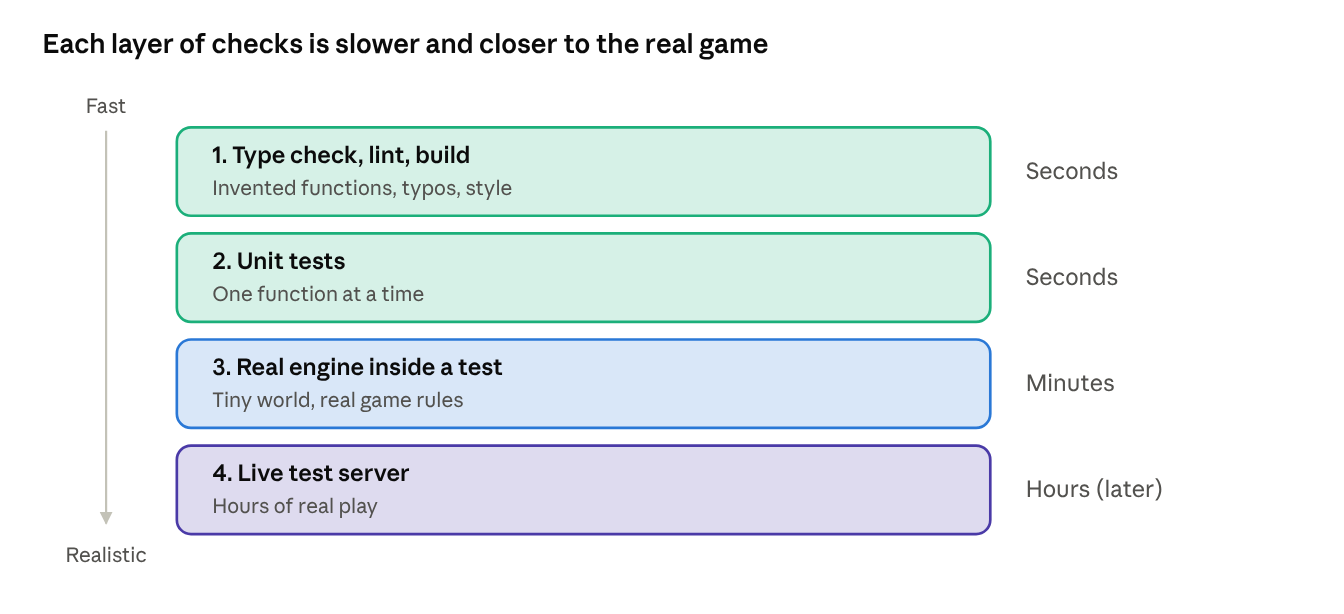
Layers 1 to 3 became the agent's definition of "done." If lint and tests don't pass, the work isn't finished, no matter how confident the commit message sounds.
Step one: clone, install, build, and a Bus error
Before letting the agent change anything, I wanted to know whether the starter even worked on this machine. It was written around 2022 for Node 16. The server runs Node 22. So step one was boring on purpose: clone the repo as the agent user, install the packages, and run the three checks the starter already had.
npm install     # download the project's packages into node_modules
npm run build   # TypeScript -> one dist/main.js the game runs
npm run lint    # style and common-mistake checks
npm test        # the starter's unit tests
Install worked, with the expected pile of deprecated warnings. Build worked. Lint did this:
> eslint "src/**/*.ts"
Bus error (core dumped)
exit code: 135
A Bus error means the operating system killed the program because it tried to read memory that wasn't really there. It is not a lint complaint. The linter crashed before checking anything. Exit code 135 is just Linux's number for that signal.
So I narrowed it down. Disk space was fine. Node ran fine. eslint --version ran fine. It crashed the same way twice, which pointed away from flaky RAM. Then eslint --debug on a single file gave the useful part:
Parsing successful: src/main.ts
Scope analysis successful: src/main.ts
Bus error (core dumped)
It read the file fine. It crashed when it started running rules. One group of rules checks that every import points at a real file, and it uses a helper called a resolver. Listing the compiled files in node_modules showed that resolver ships as a native module: a pre-compiled .node binary instead of JavaScript. Two copies were installed, one built for normal Linux (-gnu) and one for Alpine (-musl). Loading it on its own settled it:
node -e "require('unrs-resolver')"
# Bus error (core dumped)
Culprit found. Or so I thought.
The real culprit: Ubuntu's npm 9.2.0
The obvious move was to wipe node_modules and reinstall, in case a download had been cut short. That made things worse:
npm ERR! Invalid Version:Two details in that one line turned out to matter more than the error itself. First, it said npm ERR! in capitals. Newer npm, the version 10 that normally ships with Node 22, writes npm error in lowercase. Second, the crash trace pointed into /usr/share/nodejs/, which is where Ubuntu puts its own packaged copy of npm.
One version check later:
node --version   # v22.22.1
npm --version    # 9.2.0
Ubuntu ships Node 22 with npm 9.2.0, a release from 2022. Debian and Ubuntu have stayed on that version for years. That one old tool explained all three symptoms at once: it choked on a lock file it had half-written itself, it installed both the -gnu and -musl binaries because it doesn't know how to pick, and the resulting install was a mess.
The fix was a single command run as my admin user, sudo npm install -g npm@10, which put npm 10 in /usr/local ahead of Ubuntu's copy. Then a clean reinstall:
- only the
-gnubinary was installed this time require('unrs-resolver')loaded fine- lint passed with 0 errors
- the starter's 3 unit tests passed
So the Bus error was never really about the resolver. It was the symptom; an outdated package manager was the disease. I'd like to say I spotted that immediately. I did not. I spent a few rounds proving the resolver was broken before asking who installed it.
Side note: this npm fix didn't survive the series. In Part 3, Ubuntu's Node build bit me again in a different way, and I ended up replacing Node entirely. But it got me through this step.
The lock file lesson
One question was still bugging me: how did a 2025 native resolver end up inside a 2022 starter in the first place?
The answer was one line in the starter's .gitignore:
/package-lock.jsonpackage-lock.json is the file that records the exact version of every package that was installed. The starter told Git to ignore it. Its package.json only asked for "version 3.5.1 or anything newer within version 3," so every fresh install picked whatever was newest that day. In 2022 that meant pure JavaScript. In 2026 it meant a native binary the starter's authors never saw.
So the very first commit in the agent's name removes that line and commits the lock file. Now the server, my computer and the agent all get byte-for-byte the same packages, and a package only changes when someone changes the lock file on purpose. That matters more for an unattended agent than for a person: when something breaks overnight, "the dependencies quietly changed" should not be on the list of suspects.
It also set up a safety check I'll come back to in Part 2. Because the lock file is tracked, any change to the project's dependencies now shows up in a commit, where it can be flagged for review instead of slipping in silently.
What I learned, and what's next
- Check the boring stuff first. The starter was old, but the thing actually breaking was even older: the package manager. One
--versionwould have saved me several rounds of debugging. - A crash is a symptom. The resolver crashed, but the resolver wasn't the problem. Asking "who installed this, and with what?" found the real cause.
- Read the error's handwriting.
npm ERR!versusnpm errorlooks like trivia. It was the clue that pointed at the wrong npm. - Lock files matter more for agents. Reproducible installs remove an entire class of "it worked yesterday" mysteries from an unattended system.
- Types are a guard rail for models. TypeScript plus the Screeps type definitions turns invented API calls into errors the agent can catch on its own.
The starter now builds, lints and tests cleanly on the server. Before the agent pushes a single line to a public repo, though, there's a more important question: what stops it from leaking something it shouldn't? That's Part 2, and it starts with a leak that was already sitting in my own commit history.