ScreepsAiSLP Build Log · Part 2 of 8
ScreepsAiSLP Build Log – Part 2: Keeping My Secrets Out of a Public Repo
At the end of Part 1, the starter finally built, linted and tested cleanly on the server. The next job was the scary one: letting an AI agent push to a public repo with my name on it.
Two rules
My original plan was cautious: no network access for the agent, no secrets within its reach. When it came down to it, I realized I didn't care about either of those for their own sake. I cared about two outcomes:
- Nothing personal or compromising leaks. The repo is public. Anything that lands in it should be assumed copied forever.
- The agent stays in its lane. Screeps coding only. No poking at other machines, no downloading random tools, no wandering off.
If I could get those two outcomes with safeguards, the agent could have network access and a credential. (Update: in the end I took its internet away completely. The reasons, and everything else that changed, are in Part 4.)
The principle I took from the server build still applied: rules in the prompt are the soft layer. My notes already showed this local model sometimes skips steps it was told were mandatory. So every important risk also gets a hard layer, a technical block the model can't talk its way around. The list I ended up with:
- a neutral Git identity for the agent
- a leak scan before every push, with pushes blocked on any hit
- GitHub's own push protection as a second net
- a GitHub credential that only works for this one repo, and expires
- no internet for the agent at all, only the local AI model (added later, see Part 4)
- scope rules in the agent's instructions
- an alert whenever the project's dependencies change
- Cline's telemetry switched off
- the existing basics: a non-admin account, no access to my home folder, everything in Git
Turning off telemetry (the usage data an app reports back to its maker) took one setting. Cline's docs say it doesn't send code or prompts when you use your own model anyway, but "doesn't send much" and "sends nothing" aren't the same thing.
The leak that was already set up
Every Git commit records an author name and email, and GitHub shows both publicly. When I created the agent's account during the server build, I gave it a Git identity like agent@<my-server's-hostname>.local. Perfectly fine for a sandbox repo nobody sees. In a public repo, it would have published my server's hostname on every single commit the agent ever made.
The fix was a noreply address: a placeholder email GitHub gives every account, shaped like 12345678+username@users.noreply.github.com. You find it under GitHub's email settings once "Keep my email addresses private" is ticked. I set the agent's identity to the name Screeps Agent with my noreply address. The commits link to my GitHub profile, which is nice for a portfolio repo, while the name makes it obvious who actually wrote them.
This had to happen before the first push, not after. I very nearly got the order wrong anyway: the email command didn't get run, the verification caught it, and I fixed the commit with an amend (rewriting the most recent commit in place). That's only safe because the commit hadn't left the server yet. The verification step earned its keep on the very first commit.
The leak that was already public
The same verification printed the commit below the agent's, one of my own from when I created the repo. It had my personal Gmail address as the author. Already pushed. Already public. Anyone browsing the commit history could read it, and spam-harvesting bots do browse commit histories.
I had two options: leave it, which is common and costs nothing, or rewrite the repo's two original commits and replace the history on GitHub. With only two commits and no other clones, rewriting was cheap. Waiting would only make it more expensive.
Git can rewrite history with filter-branch. I matched commits by author name, so my Gmail never had to be typed into a command or a file:
git filter-branch --env-filter '
NR="<my noreply address>"
if [ "$GIT_AUTHOR_NAME" = "BurningBurrito" ]; then export GIT_AUTHOR_EMAIL="$NR"; fi
if [ "$GIT_COMMITTER_NAME" = "BurningBurrito" ]; then export GIT_COMMITTER_EMAIL="$NR"; fi
' -- main
Every rewritten commit gets a new ID, so GitHub's copy no longer matched. Replacing it takes a force-push, which overwrites history instead of adding to it. I used the safer form, --force-with-lease, which refuses if anyone pushed something in the meantime. Then I deleted Git's local backup of the old history so the old commits were gone from the server too.
One honest limitation: GitHub can keep serving the old commits for a while to anyone who has their exact IDs. They're no longer in the history, so they're hard to find, and GitHub Support can purge them on request. Rewriting stops the bleeding; it doesn't un-leak anything already scraped.
That was the first and last force-push in this project. The agent's rules forbid history rewrites outright, and as you'll see, the push setup physically refuses them.
A key that fits one lock, and a scanner that reads every commit
To push, something on the server needs a GitHub credential. I chose a fine-grained personal access token: a password-like string you create on GitHub with exactly the permissions you tick. Mine works for one repo, ScreepsAiSLP, with one permission, Contents: read and write, and it expires in 30 days. If it ever leaked, the worst anyone could do is push to a repo that's already public.
I picked it over an SSH deploy key (a key registered to a single repo) for two reasons. Deploy keys never expire. And the network allowlist planned for later is much easier with normal web traffic than with SSH.
Getting the token onto the server without it showing up anywhere took one small trick:
read -rsp "Paste token, then Enter: " T; echoread -s waits for input without echoing it to the screen, so the token never appears in the terminal, the scrollback or the shell history. One printf later it was in a credentials file only one account could read, and the variable was erased.
Then the scanner. Gitleaks is a tool that scans commits for things that look like passwords, API keys and tokens. Its built-in patterns cover the usual suspects. The things I actually worry about are more personal, so I added four rules of my own:
- my server's hostname
- local usernames and
/home/...paths - private IP addresses, the 192.168.x.x and 10.x.x.x ranges used inside home networks
- any Gmail address, so my own never has to be written into the rules file
The rules file lives in /etc/ and belongs to root. The agent can read it but can't edit or delete it, so the model can't quietly weaken its own safety check.
The test that matters for a scanner is whether it catches things. I made a throwaway repo with a commit containing a fake hostname line, a private IP and a made-up Gmail address. Gitleaks reported leaks found: 4 and exited with code 1. Four, not three: the hostname also tripped the username rule. Over-eager is the right direction to be wrong in.
The loophole: a separate account that does the pushing
A scanner only works as a hard block if you can't push without it. At this point, you could. The token sat in the agent's own home folder, so the agent could run a plain git push and skip the scan entirely. The launcher script that was supposed to run the scan lived in the agent's folder too, so the agent could edit it. Both holes were closed only by "the rules say don't," and the whole point was not to depend on that.
The fix was a second, tiny system account called gitpush. It can't log in. It owns the token and its own copy of the repo. The agent can't read either.
The interesting part was the handover. The obvious design is to let gitpush push straight from the agent's folder. That's a trap. Git runs hooks (scripts that run automatically at certain moments) and honors per-repo settings, both of which the agent controls. A malicious setting could make Git run a command as gitpush and walk off with the token.
So the agent never shares its repo. It hands over a git bundle instead: a single sealed file that holds commits and nothing else, with no settings and no hooks. The push script, running as gitpush, then checks it in order:
- Is the bundle valid?
- Does the history only add to GitHub's? A rewrite is blocked. No force-pushes, ever.
- Does every new commit use the approved noreply email?
- Is the gitleaks scan of the new commits clean?
- Did the dependency files change? If so, flag it in the log for review.
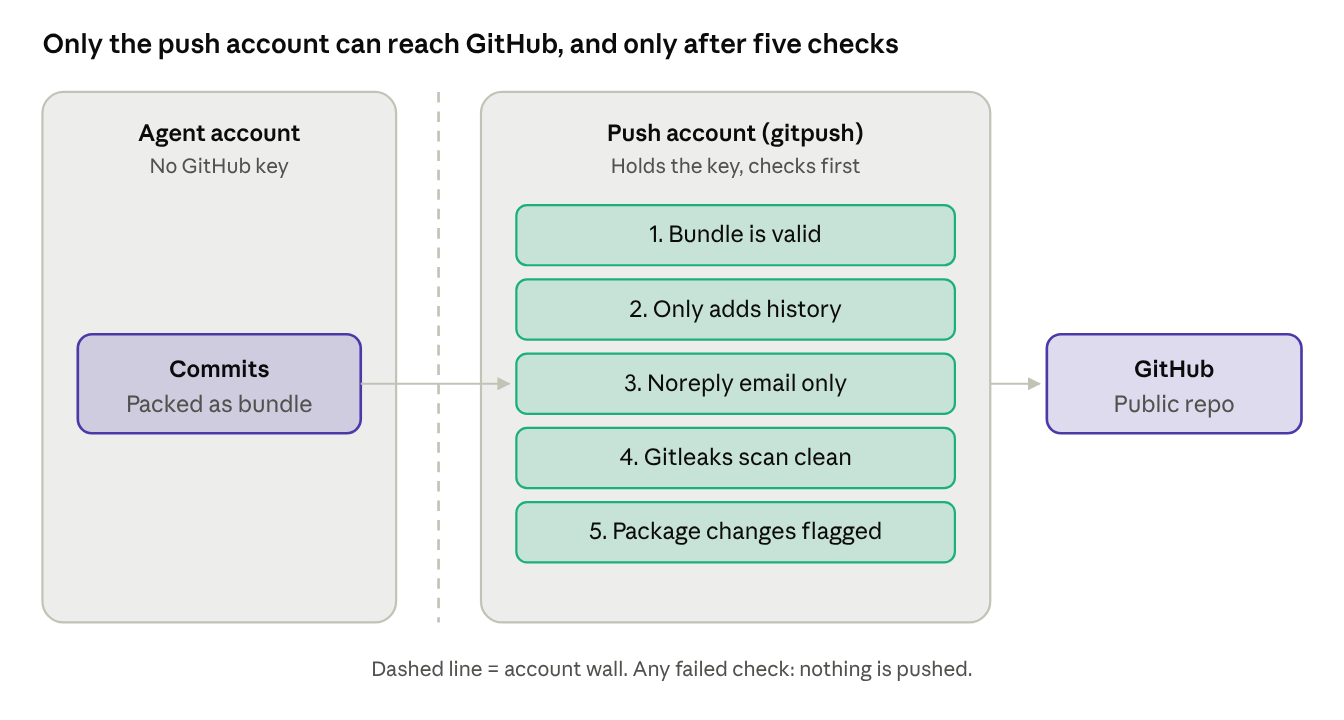
Only then does it push. Any failed check means no push and a clear reason in the log.
The last piece is a single sudo rule: the agent may run that one script, as gitpush, with no arguments. Nothing else. The launcher moved to a root-owned location too, so the agent can run it but not rewrite it.
The server's sudo turned out to be sudo-rs, a newer rewrite, which matters for one reason only. When I tested that the agent couldn't use sudo for anything else, every refusal came back as:
sudo: I'm sorry agent. I'm afraid I can't do thatThe user account is literally named agent. I have never been so pleased to be refused.
Testing it with a fake leak, then the first real push
Before trusting any of this, I tried to break it. First, the agent's own push, with password prompts turned off so it couldn't hang:
fatal: could not read Username for 'https://github.com': terminal prompts disabledGood: the agent can no longer push by itself. Then a deliberately bad commit, a file containing a fake private IP, handed over exactly the way the launcher does it:
INF 1 commits scanned.
WRN leaks found: 1
PUSH BLOCKED: the leak scan found something (details above, secrets redacted).
exit code: 5
Blocked. I deleted the test commit, which was safe because it had never left the server, and ran a "nothing new" handover to confirm the happy path didn't fall over:
Nothing new to push (GitHub is up to date).The first real push came a bit later, in Part 3, with the commit that switched on integration tests. It went through every check, raised the dependency alert because package.json had changed (exactly as designed), and landed on GitHub:
INF no leaks found
NOTE (S7): dependency files changed in this push: package-lock.json package.json - please review.
PUSHED: 1 new commit(s) to GitHub main
The whole chain now looks like this: the agent works and commits, the launcher makes a safety-net commit of anything left over, hands a bundle to gitpush, and gitpush checks, scans and pushes. The model doesn't take part in any of that. That's the point.
What I learned, and what's next
- Look for leaks you already have. The worst one wasn't something the agent might do. It was my own email, already public, and a hostname baked into the agent's Git identity.
- A scanner is only a wall if there's no door around it. As long as the agent held the token, the leak scan was a suggestion. Moving the token to a separate account turned it into a requirement.
- Hand over data, not access. A git bundle carries commits and nothing else. Letting the push account read the agent's repo directly would have let the agent's settings run code with the push account's power.
- Test the failure, not just the success. "Nothing new to push" proves very little. A fake leak getting blocked with exit code 5 proves the thing I actually care about.
- Rewrite history early or not at all. With two commits and no clones, the force-push was cheap. Every week of waiting would have made it more painful.
The agent can now push safely, but it still has no way to know whether its Screeps code actually works in the game. Part 3 puts a real Screeps engine inside the test suite, which took one more native module, one more Ubuntu surprise and one frozen terminal to get right.