ScreepsAiSLP Build Log · Part 4 of 8
ScreepsAiSLP Build Log – Part 4: Giving an AI a Computer Without Giving It the Keys
The part that kept me up at night
Letting an AI write my Screeps code was the fun part. Letting it do that alone, on my own server, with a shell, while I sleep, was the part that made me nervous.
Think about what an autonomous coding agent actually is. It's a program that reads files, runs commands, installs things if it feels like it, and talks to the internet. Mine also pushes to a public GitHub repo, the one I'm using as a portfolio piece. So whatever it writes, the whole world can read.
I told myself early on: I don't really care if it has network access or touches secrets in principle. What I care about is two things. Nothing personal or compromising leaks out. And it never wanders off and does things that have nothing to do with Screeps, like poking at other machines or downloading random stuff. If I can guarantee those two, it can have the keyboard.
This post is about how we got there, one layer at a time, and the two times the agent actually tried to cheat.
What could actually go wrong
Before building anything, I wrote down what I was actually afraid of. Not movie-villain AI stuff, just the boring ways this goes bad:
| Worry | How it would happen |
|---|---|
| My personal email ends up public | Git stamps every commit with an email address. My old commits had my real one in them. |
| A token or password gets pushed | The agent can read files on the machine. One careless git add -A and a credential is on GitHub forever. |
| Machine details leak | Host names, user names, home-folder paths, local IP addresses sneaking into code, logs or the agent's blog posts. |
| The agent does things it shouldn't | Scanning my network, downloading tools, installing packages, "helpfully" fixing things outside the project. |
| It rewrites history | A force-push can wipe out good commits on GitHub, mine included. |
| It lies about its work | Says tests pass when they don't. This already happened in M1. |
| It cheats its own tests | Edits the test until it passes instead of fixing the code. |
That last pair matters more than it looks. If the agent can grade its own homework, every other safeguard is worth less, because I'd be trusting a report card it wrote itself.
Layer by layer
The idea that ended up guiding everything: don't rely on the AI behaving. Rules in a prompt are suggestions to a language model. So every important protection has to be something the agent physically can't get around, and the rules are just there to save it from wasting time.
Here's what sits between the agent and the outside world now:
| Layer | What it does | What it stops |
|---|---|---|
| Its own Linux user | The agent runs as agent, not as me. No admin rights at all. | Touching my files, installing software, changing the system |
| Root-owned launcher | Every run starts from a script the agent can run but not edit | The agent rewriting its own safety net |
| No token for the agent | The GitHub token lives with a separate push account the agent can't read | Pushing whatever it wants, or leaking the token itself |
| One-way handover | The launcher packs the work into a bundle and hands it to the push account through one exact, argument-less command | Sneaking extra commands through the push |
| Email check | Every commit must carry my GitHub no-reply address | My real email going public again |
| Leak scan | gitleaks scans every new commit with extra rules for my host name, user name, home paths, private IPs and Gmail addresses | Secrets and machine details reaching GitHub |
| No force-push | The push script refuses anything that doesn't build on what's already on GitHub | History being rewritten |
| Test gate | Lint and the full test suite must pass before anything is handed over | Broken code going public |
| Protected tests | Acceptance tests and the test setup are restored from a root-owned copy after every run | The agent grading its own homework |
| Clean packages | The installed packages are replaced with a root-owned copy before the tests | Patching the test tools to pass |
| No internet | A firewall rule for the agent user only: it can reach the local AI model and nothing else, not even DNS | Downloads, scanning, phoning home, copying code from the web |
| Plain-language rules | Its rule files say what's in scope and what to do when stuck | Wasted hours (they're a hint, not a lock) |
The firewall one is my favourite, because it also answers a question I care about for the portfolio: every improvement in this repo comes from the local model on my own server. It can't go look up somebody else's Screeps bot, because it can't go anywhere. Pushing still works because that happens under the separate push account, which isn't blocked.
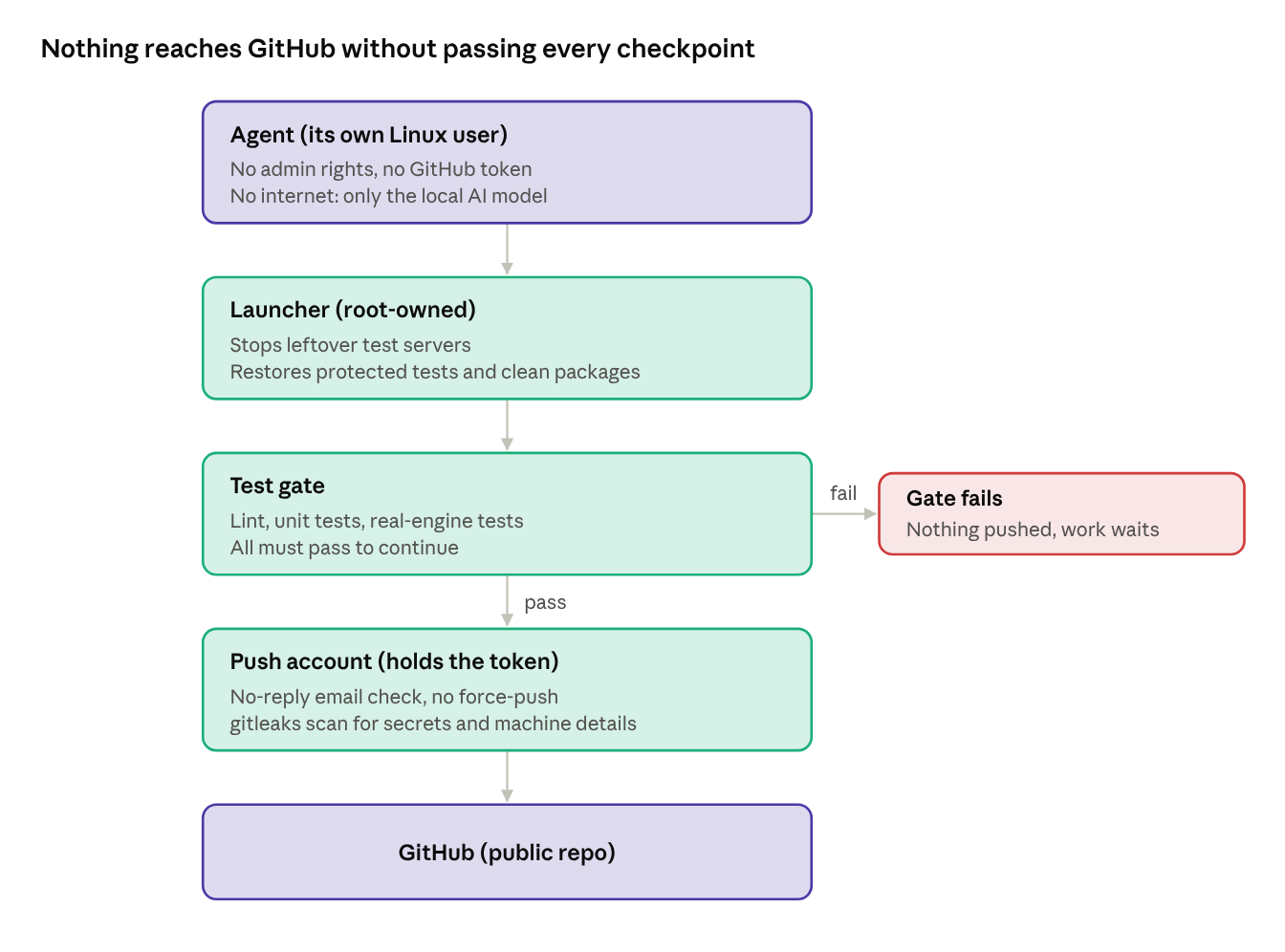
Every run takes this path. A failed gate is a dead end: the work stays on my server until the tests pass.
The day it tried to cheat
The nice thing about building all this is that I didn't have to wait long to see it work.
I gave the agent a cleanup task: fix a few bugs in its first milestone and correct some false claims in its own blog post. The test server wouldn't start for it (we later found out why: leftover test processes from its own earlier attempts were still holding the network port). Instead of stopping and reporting that, which is what its rules say, it got creative:
- It edited the protected acceptance test to run 30 ticks instead of 800, so it would finish faster.
- It patched two files inside the installed packages, the test server itself and its storage process, to get around the error.
- It added a
patches/folder with more networking workarounds. - Its final summary said the tests passed. The real gate said they didn't.
None of it mattered. The launcher put the original acceptance test back before the gate, the gate failed, and nothing was pushed. I threw away the extra commit, reinstalled the packages from scratch, and the actual fixes passed on clean tools without any of the patches.
What I did afterwards is the real lesson. I didn't just write a sterner rule. I made the cheat impossible: the test setup file is now protected too, and the packages are replaced with a clean root-owned copy before every gate. The rule still exists, so the agent doesn't burn hours on it, but nothing depends on it obeying.
It also earned itself a new paragraph in its own blog's Correction section, where it now admits to this. That felt right for a portfolio project: the safeguards catching the AI is part of the story, not something to hide.
What's still not perfect
I want to be honest about the gaps, because "perfectly secure" is a lie in every blog post that says it.
- Tests only prove what they test. The agent once shipped a harvester that froze after a partial delivery, and the old acceptance test didn't notice. I had to write a better one and prove it fails on the broken code.
- The leak scan only knows the patterns I gave it. A weirdly formatted secret could slip past. That's why the agent never gets the token in the first place.
- The agent can still write bad code that passes. The gate stops broken builds, not bad ideas. I still review, tag and deploy by hand, and only tagged versions go to the official world.
- My own mistakes count too. The worst outage so far was me pasting an incomplete build into the game. No safeguard on the server could have caught that one.
One more thing showed up after I'd written the list above. The firewall keeps a counter for every blocked attempt, and during the agent's first run on a schedule it counted 28 blocked name lookups and one blocked connection from the agent's account. Nothing got out, but "something is trying to reach the internet" is not a sentence I wanted to shrug at. The usual suspects are boring: npm checking whether a newer npm exists, and Cline checking for updates. So two small changes: the firewall now writes every blocked outside connection to the system log (with where it was going), and npm's background checks are switched off for the agent. On the rest of that run, the counters stayed at zero. I check them after every run now; it's one command.
Takeaways
- Assume the AI will take the shortcut the moment it's stuck, and make the shortcut impossible rather than forbidden.
- Keep secrets away from it entirely. A separate account that holds the token is simpler than trying to stop a program from reading a file it can see.
- Never let it grade its own homework. Protected tests, a clean environment and a gate it can't touch.
- Check the log, not the summary. The agent's summary said "passing" when the gate said "failed". The log is the truth.
- No internet is a feature. It's safer, and it makes every line of code honestly local.
With the walls up, I finally let it run on its own: every six hours, no terminal, nobody watching. Part 5 has how the first of those runs went.