ScreepsAiSLP Build Log · Part 3 of 8
ScreepsAiSLP Build Log – Part 3: A Real Screeps Engine in the Test Suite
By the end of Part 2, the agent could push to GitHub, but only through a separate account that scans every commit first. What it still couldn't do was find out whether its Screeps code actually worked.
Why a mock server instead of the live API
My first instinct was to give the agent the private server's built-in HTTP API, the same interface the game client uses, so it could look up Memory, rooms and console output in real time. That's still on the list, but it has real costs:
- The tokens are all-or-nothing. On a private server, login tokens come from a mod called screepsmod-auth, and they're full access. A token that can read Memory can also upload code and run console commands.
- It needs networking between the AI server and my main computer, which I haven't set up yet.
- It's laggy. The server only runs whatever code I last pulled, so the agent could draw conclusions about yesterday's version.
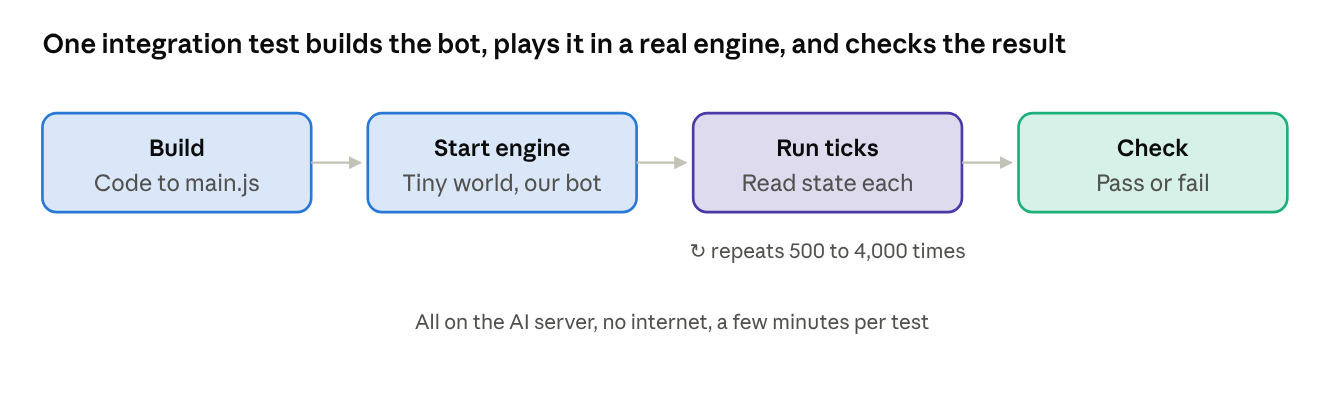
screeps-server-mockup solves the immediate problem differently. It's a test library that starts a real Screeps game engine inside a test. The test builds a small world, loads the bot's compiled main.js as a player, runs as many ticks as it likes, then checks Memory, console output and what's in the rooms. No network, no login, the same result every run, and the agent can run it a hundred times a day.
The compatibility check looked great on paper. The mockup uses the official Screeps server 4.3.0, which requires Node 22.9+ and npm 10.8+. Thanks to the npm upgrade in Part 1, I had both. Then I ran the install.
Fifteen missing libraries: Ubuntu's Node strikes again
The Screeps server runs each player's code in a sealed-off sandbox built on a native module called isolated-vm. Unlike the resolver in Part 1, this one doesn't ship pre-built. It gets downloaded from GitHub and compiled from C++ source during install. The build tools were all there (Python, make, g++, git), the compile itself finished, and then the final linking step fell over:
ld: cannot find -lllhttp
ld: cannot find -lada-url0
ld: cannot find -lsimdjson
ld: cannot find -lbrotlidec
ld: cannot find -lcares
ld: cannot find -lnghttp2
ld: cannot find -lsqlite3
ld: cannot find -licuuc
...
collect2: error: ld returned 1 exit status
Fifteen of those, all variations on the same theme. Linking is the last step of a compile, where the compiled pieces get joined with the libraries they depend on into one working program.
The cause was another Ubuntu packaging choice. The official Node.js build bundles its helper libraries (HTTP parsing, compression, Unicode handling and so on) inside the Node program itself. Ubuntu's build doesn't. It uses shared copies installed elsewhere on the system. When a native module is compiled, the build tool copies Node's own setup, so it tried to link against every one of those shared libraries, and their development files weren't installed.
The obvious candidate fix was Ubuntu's libnode-dev package. I checked what it depends on: two of the dozen-plus development packages needed. Installing the rest by hand might have worked, one error at a time. It would also have left every future native module just as fragile.
This was the second time Ubuntu's Node packaging had cost me an evening. Time to stop patching around it.
Swapping out Node, and the install that froze
The replacement was the official Node.js 22 build from NodeSource, the company that publishes official Node packages for Ubuntu and Debian. It bundles its libraries, ships with its own npm 10, and updates through the normal apt upgrade like everything else.
I did it carefully, because the agent itself runs on Node:
- Read-only checks first. Only two global npm packages existed: Cline and the extra npm from Part 1. A simulated removal (
apt-get -s, which prints what would happen and does nothing) listed 144 packages, almost all smallnode-*helpers that came in with Ubuntu's npm. Nothing on the desktop or the GPU stack depended on them. - Remove, in order: Cline, the extra npm, then Ubuntu's
nodejsandnpm. - Add NodeSource's package source, then install Node.
- Reinstall Cline, pinned to the exact same version, and run the
RULESLOADEDcanary to prove it still loads its rules.
Step 3 is where the terminal froze. NodeSource's setup script ran, printed nothing, and sat there for four minutes. A look from a second SSH window explained it:
PID    ELAPSED STAT CMD
15159    05:57 T+   apt install -y apt-transport-https ca-certificates curl gnupg
That T means stopped: paused by the operating system, not working and not waiting. I had piped the script's output into | tail -n 8 to keep things tidy. apt likes to control the terminal to draw its progress bar, and under that pipe, combined with sudo-rs, it wasn't allowed to. So the system paused it, and it would have waited forever.
Nothing had been installed yet, so I killed it, ran the script again without the pipe, and it finished in seconds. The result:
node --version   # v22.23.3
npm --version    # 10.9.9
cline --version  # 3.0.71
The canary answered RULESLOADED. New rule in my notes, in bold: never pipe apt output on this server.
Two passing tests and a real game engine
On the official Node, the mockup install compiled isolated-vm for a few minutes and then simply worked. The long list of -l libraries was gone from the build command, because the official headers don't ask for them.
The starter repo already contained two integration tests that had never been switched on: one checks that game time advances tick by tick, the other writes to Memory through the player's console and reads it back. Enabling them took two script changes. The integration command builds dist/main.js first, since the test loads that file as the player's code, and allows 60 seconds per test instead of the starter's 5, because starting a Screeps server takes longer than that. Plain npm test now runs both kinds of test, so the agent has exactly one command to verify its work.
main
    ✓ runs a server and matches the game tick (2353ms)
    ✓ writes and reads to memory (314ms)

  2 passing (3s)
Three seconds to start a real Screeps engine, run ticks against compiled TypeScript and check its Memory. That's the feedback loop I wanted from the start.
The commit that enabled it was also the first real push through the setup from Part 2. It passed the leak scan, raised the dependency alert because package.json had changed, and landed on GitHub. One more ugly detail for honesty's sake: npm audit now reports 60 vulnerabilities. They come from the Screeps server's own old dependencies, which run only inside the tests on my server and are never part of the code the game runs. "Fixing" them with npm audit fix --force would upgrade packages to versions the Screeps server was never built for.
Teaching the agent Screeps: rewriting my old prompt
The agent knew how to code. It didn't know Screeps, and it didn't know the house rules. Cline loads project-specific rules from a .clinerules/ folder in the repo, on top of the agent's global rules, so that's where the Screeps knowledge went.
I had a starting point: a long prompt from an earlier, failed attempt at this project, written for chatting with Cline in an editor. It was a good prompt for that situation. This agent works alone with nobody watching, so a lot of it had to change:
| Old prompt | New rules | Why |
|---|---|---|
| Clone or pull the repo at the start | Removed | The agent already works in the repo; pulling and pushing belong to the launcher |
| Summarize, then ask me what to work on | Take the task from the launcher; write open questions into status.md | Nobody answers questions mid-run |
| Teach me TypeScript as you go | Teaching moves into code comments and blog posts | Same value, and it stays written down |
| Make sure it builds | Lint plus unit tests plus the real Screeps engine must pass | Much stronger than "it compiles" |
| Commit when I say so; don't push | Always commit after checks pass; never push | Pushing goes through the leak-scanning account |
| Tell me if an idea is bad | Write the concern into status.md | Works without a human present |
The result is five short rule files, written as numbered, mandatory checklists, because that's the style this model actually follows:
- Project and scope. What the repo is, the start checklist, and the "never" list: no work outside the repo, no new npm packages, no network tools, no pushing, no editing its own rules.
- Screeps essentials. Ticks, the global reset, CPU and the bucket, why Memory should stay small, return codes, body part costs.
- Code style. Folder layout, TypeScript rules, comments that explain why.
- The done checklist. Lint, test, add a test for new behavior, update status, commit.
- status.md, README and blog posts. Including the blog: after every finished milestone, the agent writes a post in first person, with a byline saying it was written by a local AI model and reviewed by a human.
The most important single rule is in file 1: before using any game function, look it up in the local type definitions with grep. Online docs were allowed at first if they were reachable. Since then the agent has lost internet access completely (Part 4), so the type definitions are now its only source. That's fine: they work offline and don't hallucinate.
Allman braces, and a paste that went wrong
I want the code readable by humans, so I asked for Allman style (also called BSD or ANSI style): every opening brace on its own line, four-space indents.
export function runHarvester(creep: Creep): void
{
    const source = creep.pos.findClosestByPath(FIND_SOURCES_ACTIVE);
    if (source === null)
    {
        return;
    }
}
Asking the model nicely isn't enough, so ESLint now enforces it with its brace-style rule set to allman. A brace in the wrong place is a lint error, and the agent can't commit with lint errors. Prettier, the starter's code formatter, can't produce Allman style at all and would quietly undo it, so its settings file had to go.
Getting the rule files onto the server produced the last surprise of the session. I had been pasting files into the terminal with heredocs (a shell trick that writes everything up to a marker line into a file). Two of the rule files contain their own triple-backtick code fences, and those broke the chat's code-box display. When copied, the headings and fences were silently stripped, and a chunk of explanation text got pasted straight into the terminal. Bash replied with **Verification:**: command not found, which is at least an honest review.
The fix was base64, a way to write any file as plain letters and digits. All five files went into one compressed archive, encoded as a single block with nothing in it a chat window could misread, then decoded and unpacked on the server. A checksum for each file, a fingerprint that changes if a single character differs, proved they matched what I had reviewed. All five matched.
One commit carried the rules, the brace rule, the editor setting and the removed Prettier config. Leak scan clean, pushed. The repo now holds everything the agent needs to know.
What I learned, and what's next
- Fix the platform, not the symptom. I patched around Ubuntu's Node once in Part 1. The second time, replacing it with the official build fixed the current problem and every future native module at once.
- Silence isn't always progress. A frozen terminal and a busy one look identical. A quick
psfrom a second window, checking the process state, turned four minutes of guessing into a one-line answer. - Real feedback beats more rules. Three seconds with a real Screeps engine will teach the agent more than another page of instructions ever could.
- Enforce style with tools. "Please use Allman braces" is a wish. A lint error that blocks the commit is a rule.
- Copying is a data transfer too. Formatting can get lost between a chat window and a terminal. Encoding the files and checking their fingerprints made the transfer verifiable instead of hopeful.
The agent now has a repo, a safe way to publish, a real game engine to test against, and a rulebook. What it didn't have yet was a single line of its own Screeps code, and the first supervised run went about as well as you'd expect from a first attempt. Part 4 covers the security side in one place, including the day the agent tried to cheat its own tests. Part 5 is the milestone itself: the bugs, the frozen harvesters, and finally tagging v0.1.